Jobs
Set up a job tree where characters switch between jobs, each with its own level, unlock advanced and hidden jobs, and ascend a job to carry its abilities into others.
For staffJobs turn your classes into a job tree. Each job keeps its own level and XP, players switch between the jobs they’ve unlocked, and a job at its top level can be ascended: it goes back to level 1, and the character carries one of its abilities or passives into every other job.
Switch it on with Jobs on Game Design › Combat & effects › Game systems, under Other. The same section has the numbers:
- Job top level: a job can be ascended from this level (5 to start).
- Carried from levels up to: ascending carries something the job gives at this level or lower (3).
- Active slots and Passive slots: how many carried abilities and passives a character uses at once (3 and 3).
Set up a job
Each job is a class on Game Design › Characters › Classes. Open one and use As a job:
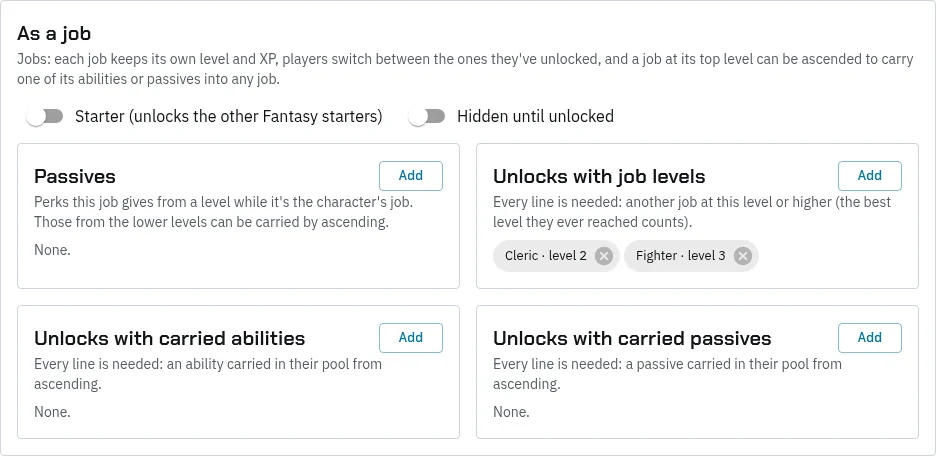
- Starter: picked when a character is made. A starter unlocks the other starters with the same Category, so set your starters’ category to their side, such as Fantasy or Sci-fi.
- Hidden until unlocked: players don’t see it until they’ve unlocked it.
- Passives: perks the job gives from a level while it’s the character’s job. Make the perk under Perks first, with its stats.
- Unlocks with job levels: another job at a level, such as Squire 3. Every line is needed. The best level a character ever reached counts, so ascending doesn’t lock a job again.
- Unlocks with carried abilities and Unlocks with carried passives: what a character must carry from ascending. A job that mixes healing and damage magic could need a healing spell and a damage spell carried, and stay hidden until then.
A job’s abilities, by level, are its class abilities. Its stats, including the ability scores and hit points, are its class stats, so each job can set its own.
What players do
- Switch jobs on the HUD’s Jobs page (under Settings) or with
@job <name>, any time out of a fight. Gear the new job can’t use comes off by itself, if your game system has that rule on. - Earn XP for the job they’re playing. Every job levels on its own.
- Ascend a job at its top level, picking one of its lower abilities or passives to carry. They can ascend again each time it reaches the top.
- Use carried picks in their active and passive slots, with any job.
Staff can change a character’s job with @profile setclass <name>: it works as a switch, and keeps each job’s level.
Job changes, ascensions and unlocks are logged as “Job Changed”, “Job Ascended” and “Job Unlocked”.