Levels and XP
Set up your level chart, choose where XP comes from and how much each source gives, schedule the tasks that pay it, run awards, and check what players are earning.
For staffThis guide sets up levelling from start to finish: the level chart, what a level up gives, every way players earn XP, and how to check it’s working. Players’ side of it is in Earning XP and Levels, perks and respecs.
How it fits together
- XP is a running total. A character reaches a level when their total XP is at least that level’s number on the chart. Levelling up never spends XP.
- Each way of earning XP has its own switch, almost all of them off until you turn them on.
- The HUD shows a character’s level, not their XP. Players see their XP on the website.
| What | Where |
|---|---|
| The level chart | Game Design › Characters › Stats & levels, Levels tab |
| Stat points per level | The same page, Starting stats tab |
| How the HUD levels up | Server › Settings, Globals tab |
| XP from fights, time on the sim and crafting | Game Design › Combat & effects › Game systems, the Experience section |
| XP for roleplay | Server › Settings, Globals tab (the rp- settings) |
| Award amounts | Server › Settings, Reports & awards tab |
| The tasks that pay XP | Server › Settings, Cron tab |
| Quest XP | Each quest’s effects. See Quests and NPCs |
| Crafting XP for one recipe | The recipe’s Work and XP. See Items and crafting |
| Checking it | Staff › Players › XP leaderboard, and Logs |
The level chart
Open Game Design › Characters › Stats & levels and the Levels tab. Each row is a level, the total XP it needs, how much more that is than the level before, and the perk points it gives. You need the levels_edit permission to change it.
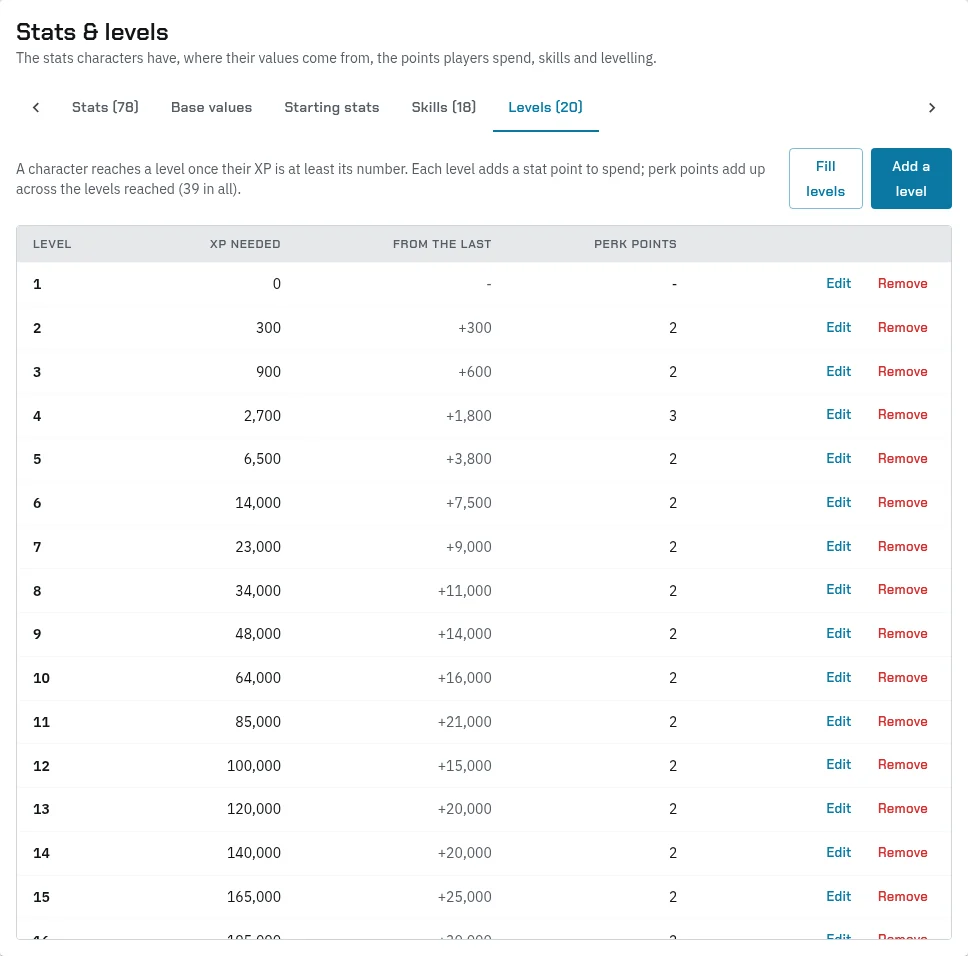
- Level 1 is where characters start, usually at 0 XP.
- The last row is the top level. XP keeps adding up past it, and the website shows “(top level)”.
- Perk points add up: a character at level 5 has the perk points of levels 2 to 5 to spend. They’re only used if your sim has perk picks on. See Characters.
To add or change one level, press Add a level, or Edit on its row. Set the Level, the XP needed and the Perk points it gives.
Fill a whole chart
Fill levels writes many levels at once from a growth rate. It shows a preview before it saves anything.
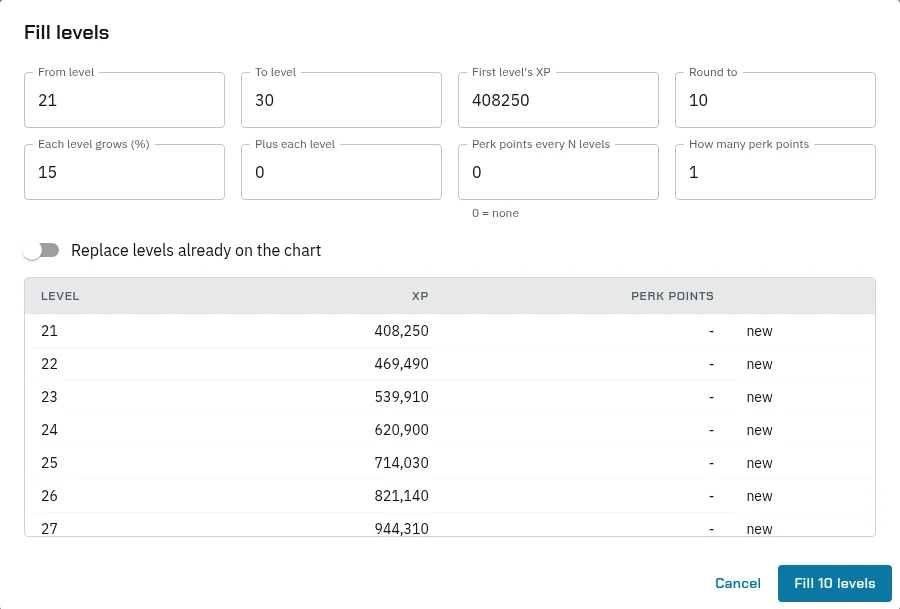
| Field | What it does |
|---|---|
| From level, To level | The levels to fill, up to 500 at a time. |
| First level’s XP | The total XP for the first level you fill. |
| Each level grows (%) | Each level after that takes this much more in total than the one before. 15 means 15% more. |
| Plus each level | A flat amount added to every level as well. |
| Round to | Each level’s XP is rounded to the nearest multiple of this, such as 10 or 100. |
| Perk points every N levels | Every level divisible by N gives perk points. 0 gives none. |
| How many perk points | How many those levels give. |
| Replace levels already on the chart | Off: levels you already have are kept as they are. On: they’re replaced. |
The preview marks each level as new, kept or replaced. It warns you if a level would take less XP than the one before it. Press Fill 10 levels (or however many) to save.
Stat points
The Starting stats tab sets the points players spend, in the Points to spend box:
profile-statsBase: the points a new character spends.profile-statsPerStep: points added at a level up, usually 1.profile-statsEveryLevels: 0 gives points at every level. A number, such as 8, gives them only every that many levels.profile-statsMax: the highest any stat can go. 0 is no limit.profile-levelUpKeepStats: 1 means a level up can only add points, not move ones already spent.
The Levels tab says “Each level adds a stat point”. That’s only true with the usual settings above.
How the HUD levels up
These globals, under Server › Settings, Globals, decide what a player does when their XP reaches a level:
| Global | What it does |
|---|---|
hud-levelSystem |
1 turns levelling on. Without it, the HUD never offers a level up. |
hud-levelStats |
1: the level up spends stat points. |
hud-levelPerks |
1: the older Level Up page spends perk points with + and -. |
profile-perkPicks |
1: players spend perk points on the HUD’s Perks page instead. |
web-charRespec |
1 or 2 lets players re-spend stat points at any time, so Level Up stays on Home. |
Home shows Level Up Available once a character’s XP passes their saved level. The player presses it, spends their points and presses Save. One save can jump several levels. It fills their bars and updates their titler. They can’t level up during a fight. The line under the name on Home, such as [Lv:4-Fighter], already shows the level their XP has reached.
Note: with roleplay rewards on and XP Grows With Level off, the roleplay task also writes the character’s saved level as soon as its XP arrives. Their perk points then arrive with it, and the HUD’s Level Up only spends stat points. The same goes for the old ActivityLevelUp task.
Where XP comes from
Open Game Design › Combat & effects › Game systems, pick your game system and scroll to Experience. The switches are at the top and their numbers below. A character earns by the game system they play under. Fight XP uses the fight’s game system.
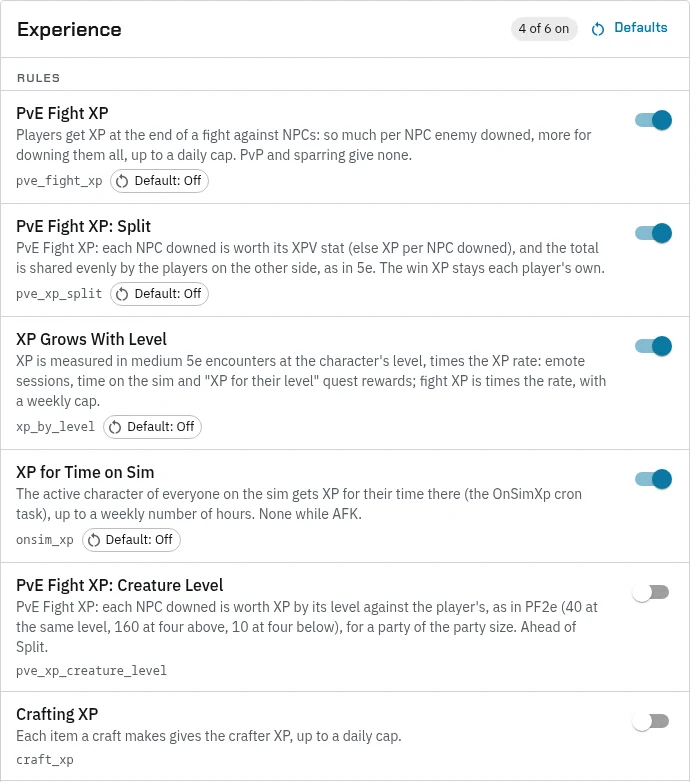
| Switch | What it does | Its numbers (usual) |
|---|---|---|
| PvE Fight XP | Each player still in a fight against NPCs gets XP for each NPC that went down, and more if they all did. Fights between players, and sparring, give none. | XP per NPC downed (2), XP for a win (10), Daily cap (30; 0 = none) |
| PvE Fight XP: Split | Each NPC is worth its own XP instead (its XPV stat, from its monster class), shared evenly by the players who beat it. | The same |
| PvE Fight XP: Creature Level | Each NPC is worth XP by its level against the player’s, as in PF2e: 40 at the same level, 60, 80, 120 and 160 for one to four levels above, 30, 20, 15 and 10 for one to four below, nothing lower. Set NPC levels on their characters. Takes the place of Split. | Party size (4): the XP is for a group this size, so each player gets the total times 4 over the players in the fight. 0 gives everyone the total. |
| XP Grows With Level | Every source is measured in “medium encounters” at the character’s level (5e’s: 50 XP at level 1, 500 at 5, 1,200 at 10, 5,700 at 20), so the same play is worth the same share of a level as characters grow. | XP rate (1), Emote session worth (1 encounter), Weekly fight cap (0 = none) |
| XP for Time on Sim | The active character of everyone on the sim earns XP each hour. Needs the OnSimXp task. | XP an hour on sim (5), Hour on sim worth (0.1 encounters, with XP Grows With Level), Hours on sim a week (20) |
| Crafting XP | Each item a craft makes gives the crafter XP. A recipe can set its own amount, or 0, under Work and XP. | XP per item crafted (10), Crafting daily cap (0 = none) |
Fights say the XP in local chat, for example “Ilsa Fenn gains 40 XP from the fight.” Crafting shows it in the craft’s notice on the HUD. Time on the sim is given quietly.
Quests
Two quest effects give XP:
- XP: a fixed amount. A negative amount takes XP away.
- XP for their level: a number of medium encounters at the player’s level, times the XP rate. It works whether XP Grows With Level is on or not.
The player sees “You gained 100 XP.” See Quests and NPCs.
Roleplay rewards
The EmoteRewards task pays XP for roleplay. Players emote on their RP channel, and the server groups emotes made near each other into scenes and scores each scene once it’s quiet. Earning XP explains the scoring for players.
Tune it with these globals under Server › Settings, Globals. If one isn’t listed, add it with Add a global. Without it, the usual number applies.
| Global | Usual | What it does |
|---|---|---|
rp-session-idle-gap |
1800 | Seconds of quiet before a scene is over and gets scored |
rp-session-min-duration |
300 | The shortest scene that pays, in seconds |
rp-emote-min-gap |
120 | Seconds between a player’s counted emotes |
rp-hash-cooldown |
86400 | Seconds before the same emote counts again |
rp-session-max-emotes |
30 | Most counted emotes per player in one scene |
rp-session-exp-cap |
75 | Most XP from one scene |
rp-daily-exp-cap |
150 | Most roleplay XP in a day |
rp-weekly-exp-cap |
250 | Where the weekly slowdown starts |
rp-weekly-softcap-bonus |
50 | How much more a week can still give past it |
rp-weekly-softcap-span |
400 | How fast that bonus is used up |
rp-weekly-softcap-floor |
10 | The least, as a %, extra roleplay still earns |
rp-currency-per-exp |
0 | Money paid per XP of roleplay; 0 = none. Set the money with rp-currency-item or rp-currency-coin |
With the usual numbers, a week of roleplay pays about 300 XP at most.
Only regions on your sim’s list of roleplay regions count. If the list is empty, nothing is paid. There’s no page for this list yet: ask the Black Box team to add your regions. The same list also limits time-on-sim XP, if it has any regions on it.
Awards and events
Players file XP reports from the HUD (Reports, XP Report) or the website (Main Menu › Awards › Submit). Each involved character must hold a role in a group.
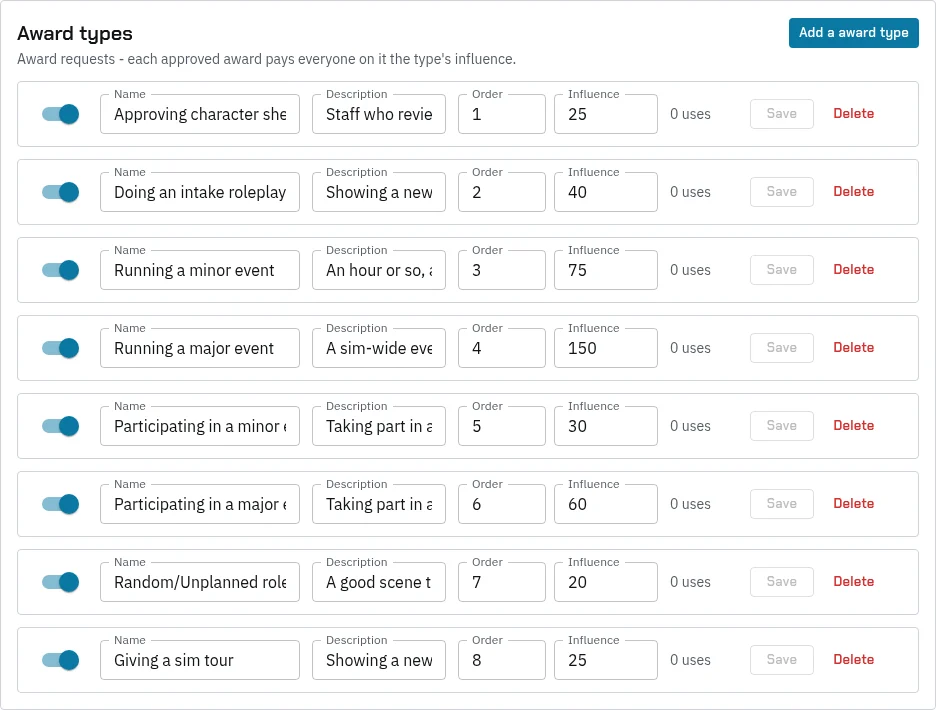
- Set what each kind of award pays under Server › Settings, Reports & awards. Each award type’s Influence is the XP everyone on it gets.
- Review reports under Main Menu › Awards › View. You can correct the award type while a report is new, add a character, and Approve or Reject it. You need
edit_awards, admin or superadmin. - The Rewards task pays approved reports, usually every 15 minutes, and marks them processed with what each person got.
Approving an event in Event approvals files award reports for the people who took part, already approved. They’re told on the HUD and paid by the next award run. events-minEmotes (2) sets how many emotes at the event someone needed to be ticked.
RewardsReminder posts to your Discord admin channel every hour when reports are waiting. To cap award XP each week, set rewards-weeklyCap to 1. Its limits per level aren’t on a page yet: ask the Black Box team.
XP by hand
| Command | Permission |
|---|---|
@admin exp add <amount> <player> |
exp_add_admin |
@admin exp remove <amount> <player> |
exp_remove_admin |
@admin exp set <amount> <player> |
exp_set_admin |
@admin exp list [player] |
exp_list_admin |
The player is told, for example “Ash Rowan has added 50 experience to your character. New total: 2590”. You can also change XP in a character’s Details on the website (exp_set_admin), or in a premade operation with the Change exp step. Every change by staff is logged with who made it.
The tasks
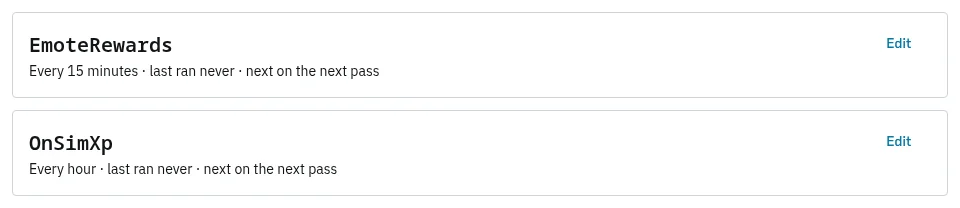
Open Server › Settings, Cron. Each task runs on its own schedule. Press Schedule a task to add one.
| Task | What it does | Run it |
|---|---|---|
| EmoteRewards | Scores roleplay scenes and pays XP | Every 5 to 15 minutes |
| OnSimXp | Pays XP for time on the sim | Every hour. It isn’t scheduled on a new sim: add it. |
| Rewards | Pays approved awards | Every 15 minutes |
| RewardsReminder | Tells Discord when awards are waiting | Every hour |
| ActivityExpReward | Older: gives a little XP to every character of anyone who’s spent an hour on the sim this week | Only if you want it |
| ActivityLevelUp | Older: gives XP and money, sets levels, and gives every character on an account the XP of its highest one | Only if you want it |
Careful: the two older activity tasks may already be scheduled on your sim. ActivityLevelUp in particular copies the highest XP on an account to all its characters every time it runs. Check your Cron tab and switch off what you don’t use.
Run OnSimXp every hour, not more often. Each run pays for the time since the last one, and a run worth under 1 XP pays nothing and doesn’t count that time again.
Check it’s working
- Staff › Players › XP leaderboard ranks accounts or characters by their XP, this week’s XP or account XP.
- Logs, then Experience, lists every XP change on the sim. Emotes shows each logged emote: its length and how many people were nearby, never its words.
- A player’s own Experience log is on their character page, under History.
- A player can type
@profile checklevelto see whether a level up is waiting.
If roleplay pays nothing, check that EmoteRewards is scheduled, that your regions are on the roleplay list, and that players are using their RP channel with emotes of 20 characters or more.