Your titler
What the text over your head shows, how to change your title, alt name and info, presets, and what changes when you're OOC, AFK or in a fight.
For playersYour titler is the floating text over your head. It’s the first thing other players read about your character. Some of it you write yourself; the rest comes from the game, such as your groups, your HP in a fight and your effects.
What it shows
Your sim decides which lines your titler has and in what order, so titlers differ from sim to sim. A typical one shows, from the top:
- your ID number or your groups and ranks, if your sim uses them;
- OOC or AFK when you’re not in character;
- your name, with your title before it and your alt name, as “Title Alt (Name)”;
- lines about you that your sim adds, such as your level, species or infamy;
- your info, one titler line for each line you wrote;
- your effects: buffs, debuffs and cooldowns, and “Wanted” if a lawful zone wants you.
Each line has one colour. Your name is often in your group’s colour.
Change your text
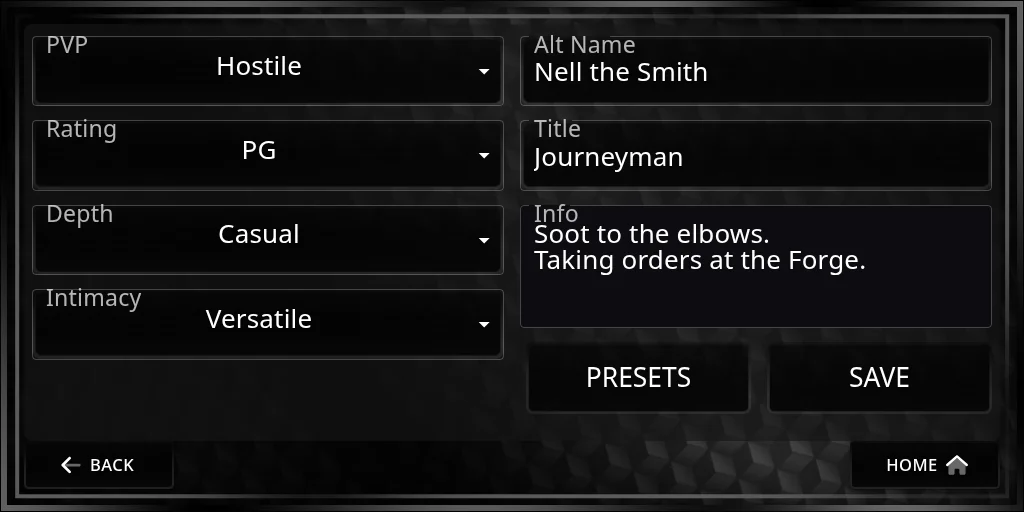
You write three things yourself, for the character you’re playing:
| What | Where it shows | Limit |
|---|---|---|
| Title | Before your name | 25 characters |
| Alt name | With your name after it in brackets; your RP channel posts under it | 25 characters |
| Info | Under your name, one titler line per line you write | 500 characters |
Set them on the HUD under Settings › Titler, or from chat:
@profile title <text>and@profile title reset@profile altname <name>and@profile altname reset@profile info <text>(chat sends one line, so write longer info on the Titler page)
Press Save on the page to keep your changes.
Your sim may also add lists to the Titler page, such as PvP, rating, depth and intimacy. What you pick shows on your titler. See Settings for the whole page.
Presets
A preset keeps a whole look: alt name, title, info and your list choices. Save a few and switch between them, for example one for patrol and one for downtime. Use Presets on the Titler page, or @profile preset save <name>, @profile preset load <name> and @profile preset list in chat. See Settings.
In character, OOC and AFK
Set your mode with the button on the Home screen or @ic, @ooc and @afk. Out of character and away, your titler is usually short: your ID number or groups, OOC or AFK, and your name. Your sim chooses exactly what stays.
In a fight
Once a fight starts, your titler changes so everyone nearby can follow it. Depending on your sim, it can show:
- your party and team, and “Sparring match” if the fight is a spar;
- an HP bar, such as
HP 24|30 |▓▓▓▓▓▓▓▓░░|, and Energy and Mana bars; - your armor, your position (row, stance and cover) and your weapon statuses, such as “Bleeding 2”;
- “PLAYER DOWN” when you’re at 0 HP.
Your info and roleplay lists are usually hidden during a fight, and come back when it ends.
If it looks wrong
- Out of date: type
@reloadto redraw it. - Blank or missing: take your titler off and wear it again. When it’s worn, the HUD sends it your text.
- Lines cut off: a titler line holds about 250 bytes, and symbols such as ▓ or emoji take more than one. Shorten your title or info.
- A line you expect isn’t there: your sim may not use it, or may show it only in some modes. Ask your sim’s staff.